Toilet Verse Tower Defense Controls
Place and inspect on click or R2, cancel with B or O, then sell and auto skip from the HUD.
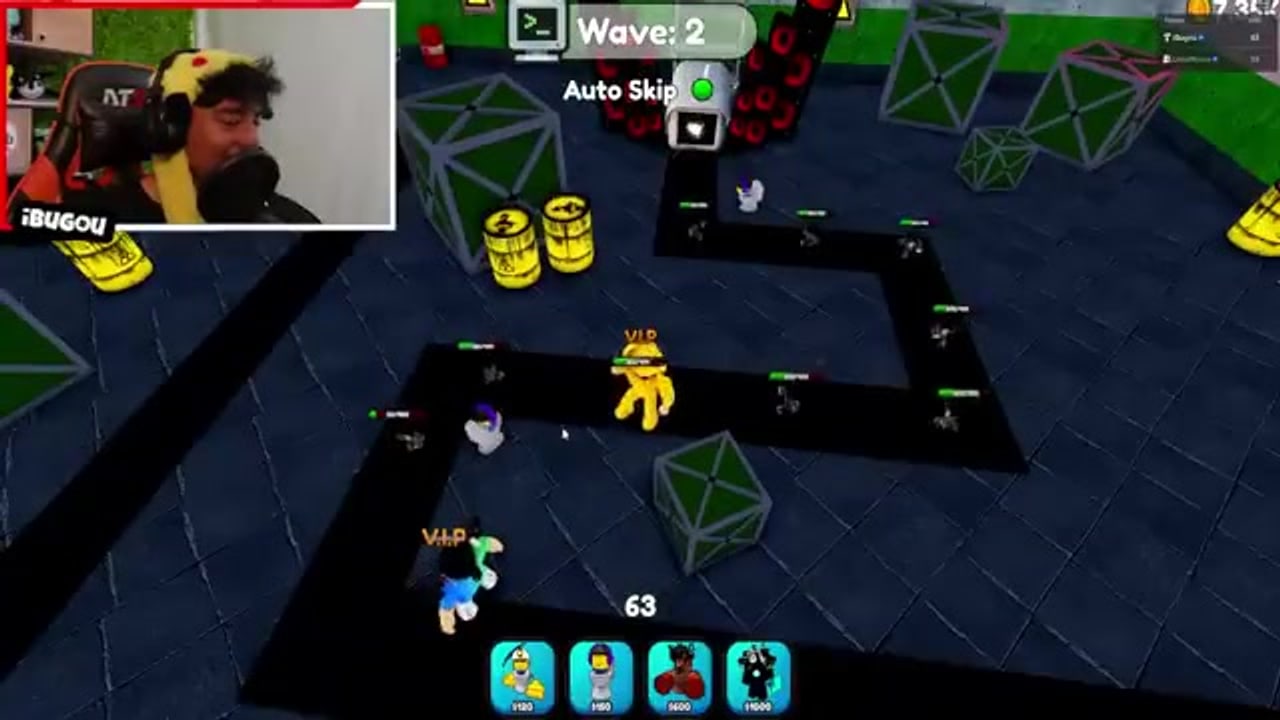
Toilet Verse Tower Defense uses a short control set. You select a toilet from the five-slot bar, ghost it onto a legal tile, confirm the place, then inspect that same toilet to upgrade or sell. The official Roblox description only prints the console lines, because those are the ones people miss: R2 = Place / Inspect Troop and B–O = Stop Placing / Close Inspect. Everything else is on-screen buttons.
This page is the input map for PC mouse and for gamepad. It is not a strategy guide. If you need the match loop around these buttons, use how to play. If you are still in the first hour, use Getting Started.
PC placement and inspect
On keyboard and mouse the flow is click-driven.
- Click a unit in the five-slot bar at the bottom of the HUD. Slot order is the order you equipped in the lobby — swap names before you step on a platform.
- Move the ghost preview over the lane. A valid tile shows the range circle. A blocked tile, a path tile, or a placement over the ~15 cap refuses the place.
- Left-click to place.
- Left-click an already placed toilet to inspect. The inspect panel is where upgrade and sell live. There is no separate “sell key” advertised by the developer; if sell is not on screen, you are not in inspect.
- Click empty ground or close the panel to leave inspect.
Do not spam-click the map while a ghost is active. Each click is a place, and the cap fills with level-1 copies you cannot afford to upgrade. If the ghost is stuck, change selected slots or re-click the same slot to drop the ghost rather than dumping a Titan on the spawn.
Console placement and inspect
The developer printed two bindings because pads do not have a hover cursor in the same way.
| Action | Console |
|---|---|
| Place a selected toilet, or inspect a placed one | R2 |
| Stop placing / close inspect | B (Xbox) or O (PlayStation Circle) |
Select a slot with the face-button / bumper flow the HUD highlights, move the ghost with the stick, then tap R2 to confirm. Tap R2 on a placed toilet to open inspect for upgrade and sell. Tap B or O when the ghost is on a bad tile — that is the binding that saves a match, not a hidden combo.
R2 is not “fire.” Toilets shoot on their own. If you hold R2 hoping for a manual shot, you will either place extra copies or flicker the inspect panel. Place, let the toilet work, inspect only when you have cash.
Sell, upgrade, auto skip
Upgrade and sell are inspect-panel buttons on both PC and console. Inspect first, then tap the button. Selling refunds a portion of the place cost and frees a cap slot. Upgrade spends match cash only — gems, spins, and XP potions stay in the lobby.
Auto skip is a HUD toggle, not a keybind. Turn it on when the lane is already built and you are farming City or grinding Endless waves. Turn it off when you are learning a map, moving a miner, or waiting to parasite a boss you need to see. Manual skip (the skip button after a wave clears) is the same idea without the toggle: the leftover timer does not pay extra coins.
The Codes button sits on the left of the lobby HUD. It is not a match control. It also does nothing until you have 20 minutes in the experience — details on how to redeem. Do not hunt a console shortcut for Codes; open the same left-side button with the cursor or the pad pointer.
HUD pieces people miss
- Five-slot bar — loadout, not inventory. Inventory is the lobby collection of exclusives, parasited bosses, and crate pulls.
- Placement cap — around 15. The ghost will refuse when you are full even if cash remains.
- Range circle — trust it more than the model size. Titans look large and still miss a bend if you park them one tile too far.
- Difficulty on the pad — Easy / Medium / Hard is chosen before the match. You cannot change it from inspect.
- AFK pad — lobby only. Premium 2x coins apply there, not to R2.
Camera on a pad is still the right stick. If you cannot see the lane, you will place on a roof that does not cover the path. Re-center before you confirm.
If a button does nothing
When R2 “does nothing,” you are usually not hovering a legal tile, you are already at the placement cap, or you are in inspect on a toilet that has no remaining upgrade. Tap B or O to close inspect, select a cheaper unit, and try a different tile. When B or O “does nothing,” you are not in place or inspect — those bindings cancel a ghost, they do not open the shop.
When click-to-place does nothing on PC, check that a slot is actually selected. Clicking the map with no slot selected inspects whatever you hit, including the ground, which looks like a dead input. Select Miner Toilet or Drill Miner first on a new account; a locked Exclusive slot will also eat clicks.
When sell is missing, you are looking at the unit bar, not at inspect. Inspect is a second action on a placed toilet. When auto skip seems broken, you are in the lobby. Auto skip is a match HUD control. When Codes does nothing, the 20-minute lock is still running — go play City Easy or stand on AFK, then try again from the codes list.
If every input feels delayed, you are in a full 50-player lobby with the camera buried in a Titan model. Reset the camera, cancel the ghost, and place one miner before you touch DPS. Wrong inputs during that panic are how people drop their only Godly on a blocked tile and then leave the match. Stay in the match, inspect, sell, replace. The maps page tells you which lanes punish a bad corner; this page only tells you how to undo it.
Console players who came from Toilet Tower Defense will look for a rotate button. TVTD’s printed bindings do not include a rotate line. If a toilet has a facing, it is set by the tile you choose, not by a Y-rotate hold. Pick a different tile instead of hunting a bind that the description does not give. PC players who came from other Roblox TDs will look for number-key hotkeys; if a number key does not swap slots in your session, use the on-screen bar — the developer did not document number keys, and this wiki will not invent them.
Once place, inspect, sell, skip, and cancel are automatic, stop reading inputs and go play. City Easy is still the drill map. How to play is the loop. Boss Mode and Endless use the same R2 and the same sell button with larger health bars. Parasite rolls happen after the kill, not from a secret trigger — see how to parasite.
Frequently Asked Questions
Quick answers to the most common Toilet Verse Tower Defense questions.
What are the official console controls?
R2 places or inspects a troop. B on Xbox or O (Circle) on PlayStation stops placing and closes inspect. Upgrade and sell are inspect-panel buttons.
How do I sell a toilet on PC?
Click the placed toilet to inspect, then use the sell button on that panel. There is no documented dedicated sell key.
Where is auto skip?
On the match HUD as a toggle. It is not a keyboard shortcut. Turn it off while you learn a lane or set up a parasite kill.
Why can’t I place anything?
No slot is selected, the tile is illegal, or you hit the placement cap around 15. Cancel the ghost (B/O or deselect) and inspect-sell a copy to free a slot.
Is Codes a match hotkey?
No. Codes is a left-side lobby button and needs 20 minutes of playtime. See how to redeem.